Confidence Monitors, Timers, and Presenter Comfort on Big Stages
How we size, place, and light confidence monitors, timers, and PIP layouts so keynote presenters stay comfortable and on cue.
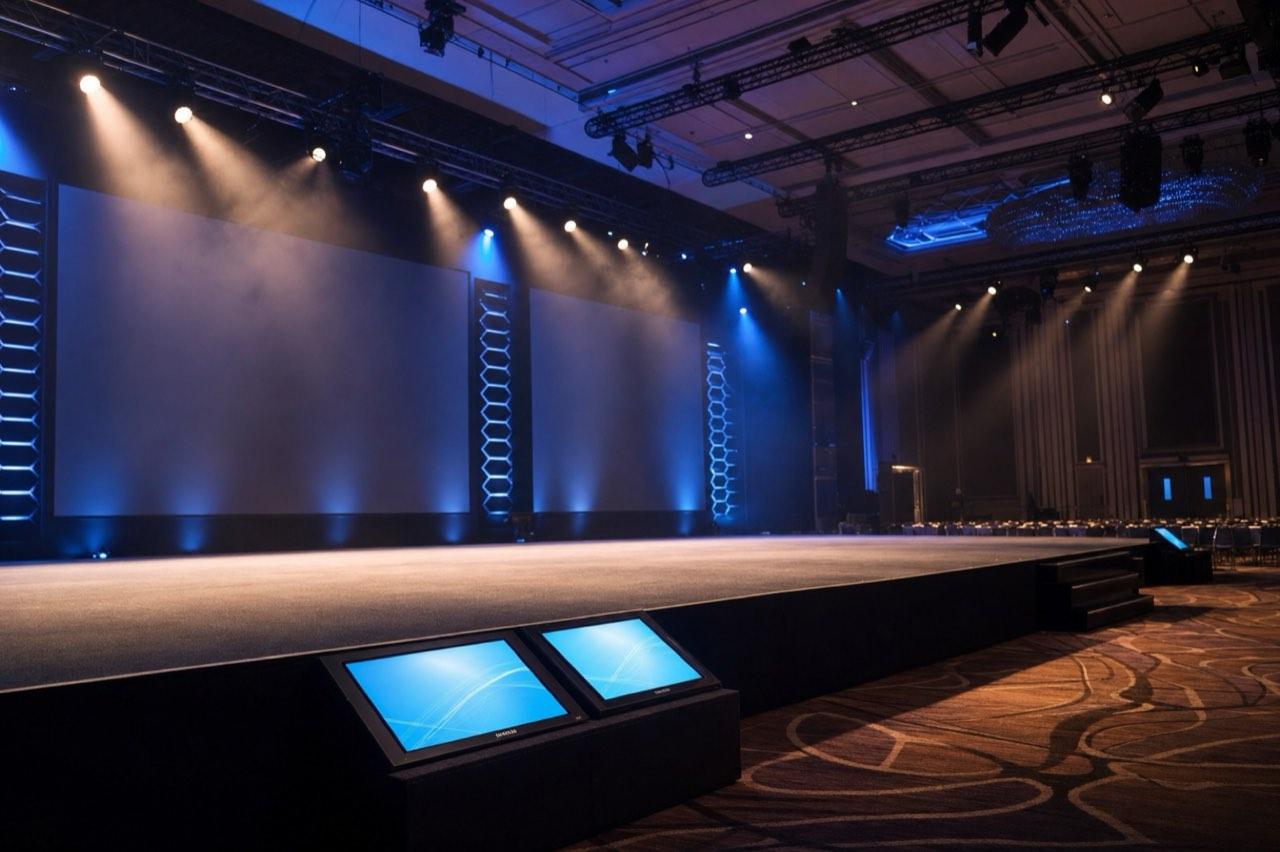
When a keynote speaker steps onto a downstage mark in front of eight hundred people, the last thing they should be thinking about is where their notes went. Confidence monitors, presenter timers, and a handful of low-tech comfort details are what let a speaker forget the room and focus on the talk. We spec and run this gear for keynotes and general sessions across ballrooms in New York, New Jersey, Connecticut, and Massachusetts, and the pattern holds no matter the venue size: the presenter-facing system has to be as reliable as the audience-facing one, because a glitch here happens in full view of the room.
what a confidence monitor actually does
A confidence monitor is a screen the presenter can see that the audience can't (or barely can). It typically shows the current slide, sometimes a running timer, and occasionally a small picture-in-picture of the presenter camera feed so a speaker can check their own framing before or during a segment. The goal is simple: give the speaker a private reference point so they never have to turn around and squint at the big screen behind them. Turning upstage to read a slide breaks eye contact with the room and reads as uncertainty from row twenty. A well-placed confidence monitor removes that reflex entirely.
downstage floor monitors vs. upstage returns
We build most keynote stages with two tiers of presenter-facing screens. Downstage floor monitors sit at the front lip of the stage, angled up at the speaker's eyeline, usually in the 24-32 inch range depending on throw distance and stage depth. These are the ones a speaker glances down at without breaking stride. Upstage return monitors, if the set design uses them, sit behind the presenter facing back toward the stage, mirroring the main projection or LED content so the speaker can gesture toward specific slide elements without turning their back on the audience for more than a beat.
The tradeoff is real estate versus visibility. Downstage monitors are closer and easier to read at a glance, but they eat into the front few feet of stage and can become a trip hazard if placement isn't marked and rehearsed. Upstage returns keep the stage floor clear but require the presenter to actually turn to read them, which some speakers hate and others use deliberately as a rhetorical beat. We ask the client which style their speakers are used to before we lock the plot, because switching habits on show day is a bad time to learn a presenter doesn't like turning their back to the room.
sizing and aspect ratio
For a single-presenter keynote, we're usually running 24 to 32 inch floor monitors in landscape 16:9, matched to whatever aspect ratio the main show content is built in. Mismatched aspect ratios between the confidence monitor and the main screen cause more confusion than people expect — a presenter glancing down at a stretched or letterboxed slide loses a half-second trying to reconcile what they're seeing with what the room sees. We always pull confidence monitor feeds from the same output as the main screen, scaled but not reformatted, so what the speaker sees downstage matches what's on the LED wall or projection behind them.
For panel formats with three or more speakers, we'll sometimes run larger 43-inch floor monitors spaced so each seat has a clear sightline without craning. Smaller monitors clustered too close together create a "which one is mine" problem that's worse than one shared larger screen.
timer visibility and placement
Every keynote runs on a clock, and the presenter needs to see it without looking like they're checking a clock. We build countdown timers into a corner of the confidence monitor feed — typically top-right — large enough to read from six feet away but small enough not to dominate the frame. Color-coded thresholds matter more than exact numbers: green with time to spare, amber inside the final five minutes, red in the final sixty seconds. Most speakers process color faster than digits mid-sentence.
Placement follows the same downstage-vs-upstage logic as the main confidence feed. If we're running a separate standalone timer (common in multi-speaker general sessions with tight turnover), we'll mount a small dedicated timer display at the edge of the presenter's natural sightline rather than centered, so it doesn't pull focus from the audience. Standalone timers need their own signal path independent of the main show computer whenever possible — if the slide advance software crashes, we don't want the clock going down with it.
picture-in-picture layouts that actually work
A common request is a single confidence feed that shows three things at once: the current slide, a small live camera shot of the presenter (for stage position and framing checks), and the timer. We build these as a fixed PIP template rather than improvising in the room:
- Main slide fills roughly 70 percent of the frame, anchored top-left or centered depending on content orientation
- Presenter camera PIP sits in a bottom corner, sized just large enough to judge framing and blocking, never so large it competes with the slide
- Timer occupies a fixed corner, color-coded, with consistent placement across every session so speakers don't have to relearn the layout between segments
- Speaker notes or next-slide preview, when requested, run in a thin strip rather than a full quadrant to avoid clutter
The mistake we see other shops make is treating the PIP layout as something to figure out in the room on show morning. We lock the template in advance during technical rehearsal and test it with the actual show computer and actual camera feed, not a placeholder graphic, because scaling and cropping issues only show up with real content.
brightness and readability under stage lighting
Stage-facing screens fight a different battle than audience-facing ones. A confidence monitor sits directly under wash light, spot light, and sometimes direct key light aimed at the presenter, which can wash out a screen that would look perfectly bright in a dim control booth. We run floor monitors at higher brightness settings than you'd expect for a normal display — often near maximum — and we always do a lighting-cued brightness check during rehearsal with the actual stage looks loaded, not just house lights. A confidence monitor that reads fine during a walk-through but disappears under a hot key light during the actual cue is a problem we've fixed more than once mid-event, and it's avoidable with a five-minute check the day before.
Anti-glare matters too. Floor monitors angled up toward a presenter can catch overhead lighting fixtures directly in the glass. We adjust the tilt angle in the room, not just on paper, because the same monitor at 15 degrees versus 20 degrees can be the difference between a clean readable screen and a mirror full of PAR cans.
notes tablets, water, and the small comfort layer
Confidence monitors solve the big visibility problem, but a handful of smaller comfort details prevent a different category of on-stage stumble. We stage a notes tablet or printed cue card at a fixed downstage mark for speakers who want a physical backup independent of any screen — batteries die, software crashes, and a printed outline never does either. We place water at a consistent, rehearsed spot rather than wherever looks convenient, because a speaker fumbling for a water bottle mid-sentence is its own small distraction, and we mark the spot with the same blocking tape we use for their standing positions.
Blocking tape marks aren't just for choreography. They tell a presenter exactly where the confidence monitor sightlines are clean, where the camera framing works, and where the lighting cue hits correctly. A speaker who wanders eighteen inches off mark can lose the readable zone on a downstage monitor entirely. We walk every keynote speaker through their marks during sound check, not just camera blocking rehearsal, specifically so they know where the confidence screen stays legible.
For speakers using an in-ear monitor (IEM) for cueing from the show caller — common in award shows and multi-segment corporate general sessions — comfort means fit-testing the earpiece well before doors open, not backstage five minutes out. A poorly seated IEM either falls out mid-walk or delivers cue audio at an uncomfortable volume, and both pull a presenter's attention away from the room at exactly the wrong moment.
failure modes we plan around
None of this gear is exotic, but it fails in specific, recurring ways, and we build redundancy against the failures we've actually seen rather than theoretical ones:
- Black-screen flashes during transitions — usually caused by a source switch on the main show computer that also feeds the confidence monitor loop. We run confidence feeds off a dedicated scaler/distribution path where possible so a slide-deck crash or source change on the main screen doesn't blank the presenter's own reference.
- Slide-clock desync — the timer drifts from the actual elapsed time because it's running on a separate clock than the slide advance system. We sync timer start triggers to the actual "go live" cue from the stage manager, not to a manually started stopwatch, and we double-check sync at the top of every session, not just once at rehearsal.
- Teleprompter feed drops — for scripted keynotes using a teleprompter rather than a simple confidence monitor, a dropped feed is the highest-stakes failure on the list. We run a backup feed path and keep a printed script at the podium as the fallback of last resort, because a presenter mid-sentence with no prompter and no printed backup is a genuinely bad moment for everyone in the room.
- Glare and hot-light washout — covered above, but worth repeating: this gets checked with real lighting cues loaded, every time.
- Camera PIP misframing — if the presenter camera shifts position between rehearsal and show (tripod bumped, riser adjusted), the PIP framing goes stale. We lock camera positions with tape and gaffer marks just like we do for the presenter.
how we plan this for ballrooms and general sessions
Hotel ballrooms and convention-center general session rooms each bring their own constraints. Ballrooms often have lower ceiling heights and tighter sightlines from the first few rows, which pushes us toward smaller, closer downstage monitors rather than larger upstage returns. General session rooms with tiered seating or a deep throw give us more flexibility to run larger format confidence screens and rely less on floor units. Across our work in New York, New Jersey, Connecticut, and Massachusetts ballrooms and general session halls, the room dictates the plot more than the format of the event does — a 200-person breakfast keynote in a Hartford ballroom and an 800-person afternoon keynote in a Boston general session room need fundamentally different monitor sizing even if the content and run of show look similar on paper.
We also plan for speaker turnover. Multi-speaker mornings with five-minute changeovers need confidence monitor and timer setups that reset cleanly between speakers without a tech scrambling to reconfigure a PIP layout on the fly. We build those transitions into the show file in advance so the switch between speaker one and speaker two is a single cue, not a manual rebuild.
getting this right before doors open
The common thread across all of this is that confidence monitor systems fail quietly if they're not checked under real conditions — real lighting, real show computer, real camera feed, real timer trigger. A system that looks perfect in a preview during setup can still surprise you once the room lights come up and eight hundred people are watching. We build in the redundancy and run the checks before the first speaker ever steps to their mark, because that's the only way to make the whole system disappear into the background, which is exactly the point.
If you're planning a keynote or general session and want to talk through confidence monitor placement, timer setups, or presenter comfort details for your specific room, reach out at hello@eventprosource.com. We turn most quotes around within 24 hours.