Event Wi-Fi Versus Bonded Cellular: Which Do You Need
How to choose between venue Wi-Fi, dedicated circuits, and bonded cellular so your show control, streaming, and onsite teams stay online.
Your show can be perfect on paper and still fall apart because the internet was treated like an afterthought. The clicker won’t advance, confidence monitors stop updating, the speaker timer app times out, and the stream turns into a slideshow. When that happens, it’s not a "tech issue." It’s usually a connectivity plan that didn’t match what the event actually needed.
The short version: what Wi-Fi is good at, and what it is not
Venue Wi-Fi can be totally fine for attendee email, light web browsing, and basic staff coordination. It’s also the easiest option to assume will work because it’s already there. The problem is that venue Wi-Fi is shared, managed by someone who has priorities other than your show, and it’s rarely designed for production-critical traffic.
Wi-Fi is also subject to RF noise, channel overlap, and room-to-room changes. Even in a good building, you can watch performance swing when doors open, the room fills, or nearby exhibits light up their own access points. If your plan depends on "the Wi-Fi" without a clear scope, you’re taking on risk you can’t troubleshoot fast once doors open.
What bonded cellular actually solves
Bonded cellular is a method of combining multiple cellular connections (often multiple carriers) into one higher-bandwidth, more resilient connection. It’s commonly used for event streaming, remote contribution, and backup internet.
The biggest value isn’t just speed. It’s independence. You’re not sharing the venue’s uplink, not waiting for a hotel IT ticket queue, and not hoping the convention center’s provider doesn’t rate-limit you right when your keynote hits.
Bonded cellular can still fail or degrade. Congestion happens. Carriers throttle. A building can be a dead zone. The point is that you can design around it: pick carriers, position antennas, test at the same time of day, and set it up as a true backup path with automatic failover.
Start by listing what the internet is doing for your event
Before you choose a pipe, list the actual uses. Not "we need Wi-Fi." Write down who’s using it and what breaks if it drops for 30 seconds.
Here’s the mental split that helps:
- Production-critical: show control apps, teleprompter sync, confidence monitor feeds that rely on a cloud system, live stream uplink, remote presenters, comms that are internet-based
- Operational: registration check-in, badge printing, staff Slack/Teams, run-of-show docs, sponsor deliverables
- Attendee: guest Wi-Fi, exhibitor demos, general browsing
If production-critical and attendee traffic share the same network without isolation, you’re asking for trouble. This is where a dedicated circuit or a separate production network pays for itself in stress reduction alone.
Bandwidth is only half the story: latency, jitter, and packet loss
Most people talk about bandwidth because it’s the number you can point to. But streaming and real-time systems often care more about stability than raw speed.
- Latency is how long a packet takes to get out and back.
- Jitter is how much that latency varies from moment to moment.
- Packet loss is missing data, which forces retransmits or causes drops.
A "fast" connection that’s unstable will make your encoder work harder, your stream buffer more, and your cloud tools feel laggy even when a speed test looks fine. Cellular tends to have higher latency than hardline, and Wi-Fi can be stable or unstable depending on RF conditions.
If you’re doing a clean program stream to a CDN, you can tolerate some latency. If you’re doing interactive remote panels, live Q&A tools that must update instantly, or anything that relies on low-latency return video, the connection characteristics matter a lot.
When venue Wi-Fi is acceptable (and how to make it less risky)
Venue Wi-Fi can work when the show’s internet needs are light and failure doesn’t stop the program. It can also work when the venue has a strong managed network team and you’ve scoped the setup properly.
If you’re going to rely on venue Wi-Fi, push for specifics:
- Ask if they can provide a dedicated SSID for production
- Confirm whether that SSID maps to a separate VLAN with controlled access
- Get clarity on client limits, bandwidth caps, and traffic shaping
- Confirm coverage in the exact rooms you’ll use, including backstage, loading, green room, and breakout spaces
- Get an escalation contact who will be on-site during show hours
If the venue can’t answer those questions cleanly, treat the Wi-Fi as attendee-grade and build a production plan that doesn’t depend on it.
For broader production planning, it helps to sanity-check your whole tech stack against the room and the venue. The same approach we use for A/V applies here: define the use cases and plan the infrastructure. This pairs well with our general checklist post: Corporate A/V Checklist for NYC Venues.
When bonded cellular is the right call
Bonded cellular is a strong fit when you need a fast deployment, you don’t control the venue network, or you need a backup that’s independent of the building’s provider.
Typical use cases:
- Live streaming from a venue where hardline circuits are expensive or unavailable
- Remote presenter contribution where you need your own uplink
- Backup internet for show-critical systems
- Outdoor programs, tents, rooftops, and pop-ups where there’s no existing infrastructure
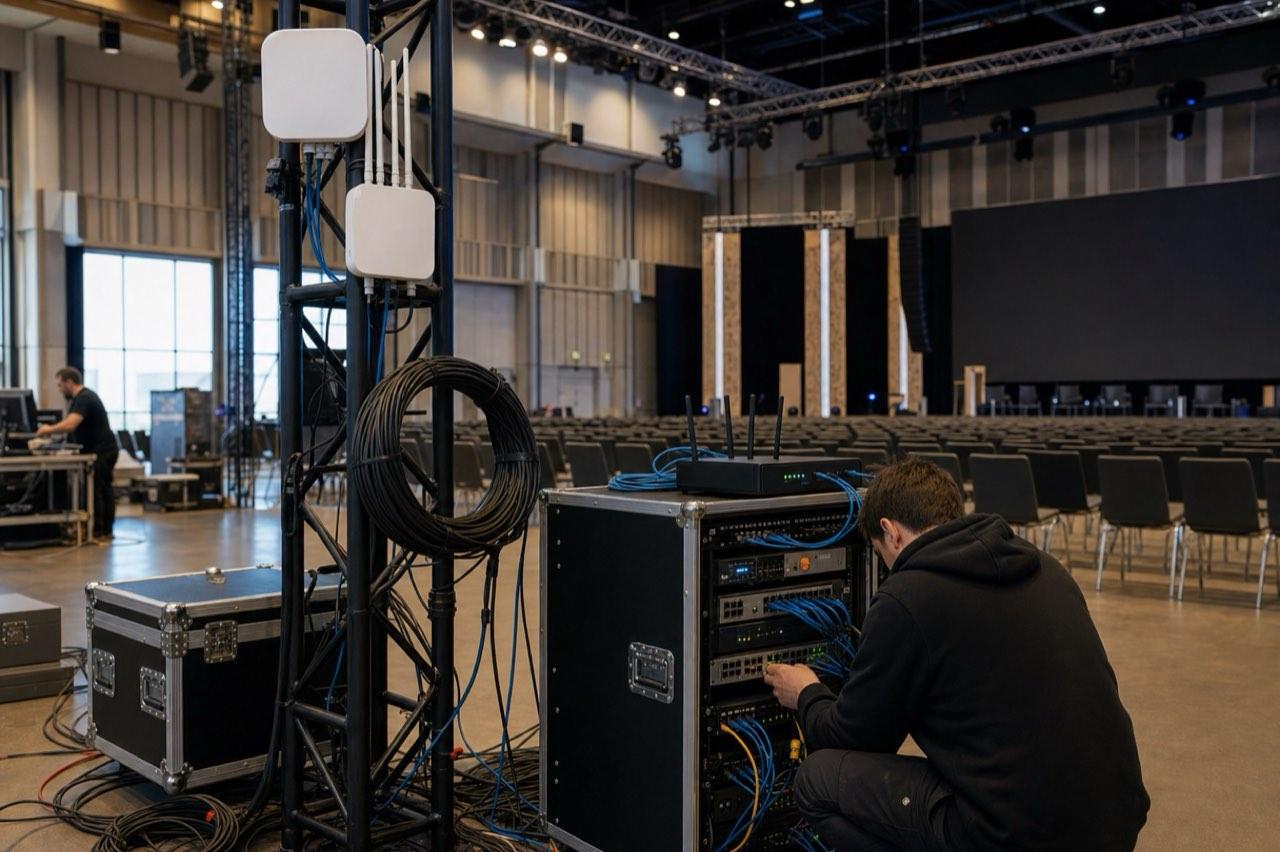
Bonded cellular also makes sense when you’re moving rooms or doing multi-site activations. It’s a repeatable kit: modem(s), bonding router, antennas, power, and a tested configuration.
If you’re doing anything outdoors, weather and power planning often dictate where the network gear can live. Pair this with weather planning basics so you’re not building a network station in a puddle: Outdoor Staging Weather Planning.
The most reliable option: hardline with cellular backup
If you want the simplest answer for high-stakes corporate programs: a dedicated hardline circuit (or venue-provided managed line) with a bonded cellular backup is hard to beat. Hardline gives you stable latency and consistent performance. Cellular gives you independence if the building’s uplink takes a hit.
The mistake is treating cellular as the primary without testing, or treating venue internet as guaranteed because "it’s a hotel." The best setups assume failure and build a second path.
From a practical standpoint, we like designs where:
- Primary: dedicated circuit (hardline)
- Secondary: bonded cellular
- Local network: your own switches, your own DHCP scope, and your own Wi-Fi access points for production devices
- Monitoring: someone watching the uplink and local network health, not just the stream preview
This is the same thinking you apply to power distribution. You wouldn’t run a show off a single household outlet without a plan. Internet deserves the same respect. If you need a refresher on power planning, see: Event Power Distribution: Generators, Cam-Lok, and Distro.
Practical planning: what to ask, what to test, and when to arrive
Internet planning fails when it’s treated as an email thread instead of an on-site test. Here’s how to make it real.
Ask the venue for a network one-pager
You’re looking for the basics: ISP, uplink capacity, redundancy, where handoffs can be delivered, and what support looks like on show day. A clean venue can provide this in one page. If they can’t, assume you’re going to self-provide for production-critical needs.
Schedule a real test window
Test when the building is busy, not at 8 a.m. on an empty Tuesday. If your show is a Thursday afternoon, test Thursday afternoon or as close as you can. Congestion patterns matter.
Do a device-level test, not just a speed test
Speed tests are fine, but test the actual workflow:
- Encoder push to your destination
- Remote presenter video return
- Q&A and polling tools
- Registration scans and badge printing
- Any cloud-controlled playback or signage
If something’s going to fail, you want it to fail in rehearsal, not in front of 600 people.
How we build a production internet kit (the stuff that gets forgotten)
When you’re building your own network for a show, half the problems come from the small stuff. Here’s a short list of items that separate "we brought a router" from "this is a show network."
- Spare patch cables in multiple lengths, labeled
- PoE injectors or PoE switches for access points
- A small UPS for modem/router/switch so brief power dips don’t reset the stack
- Antenna mounts and extensions to get cellular antennas away from metal truss and LED walls
- A written IP plan (even a simple one) so you’re not guessing under pressure
Keep the kit packed the same way every time. That consistency is what makes fast load-ins possible.
Choosing based on the show type
Different event types push the internet differently.
Corporate conference keynotes
If the keynote is being streamed, recorded, translated, or tied into a live Q&A platform, treat the internet like a primary utility. A dedicated line plus bonded backup is the safe call.
If you’re also deploying significant video systems like LED walls, make sure your network plan accounts for where racks live, where cable paths run, and how you’re keeping network gear cool and powered. Our LED wall rental service page gives a sense of how these systems get staged and supported in real rooms.
Trade shows and brand activations
Trade show floors and activations are RF chaos. Everyone is running hotspots. Exhibitors bring their own gear. If your activation depends on a stable uplink, assume you’ll need a managed solution, not just the hall Wi-Fi. For permitting and coordination in NYC-style environments, it’s worth reading: Brand Activation Permits in NYC.
Outdoor programs, tents, and pop-ups
Bonded cellular is often the primary because there’s no other option. In that case, you’re planning antenna placement, power stability, weather protection, and backups. If you’re also bringing staging, make sure the network station has a safe home that stays out of foot traffic. Our staging services page covers typical temporary builds and how we route cable safely.
A decision checklist you can use on your next show
When you’re picking between venue Wi-Fi and bonded cellular, ask these questions:
- If the internet drops for 30 seconds, what breaks—and does the show stop
- Can the venue give you a dedicated SSID/VLAN and on-site support during show hours
- Do you need stable low-latency performance for interactive remote elements
- Can you test in a realistic time window
- Do you have a truly independent backup path
If you can’t answer those cleanly, plan for a dedicated connection and/or bonded cellular as part of the production package.
Bring the internet plan into the production call early
The best time to fix internet is before you’ve built the show around a cloud workflow. Put connectivity on the same call as audio, video, power, and labor. It affects load-in, rack layouts, rehearsal timing, and staffing.
If you want EventProSource to spec the right connection for your venue and show format, we can build a plan that covers the primary line, the backup path, and the on-site distribution so show-critical devices stay isolated from guest traffic. Email hello@eventprosource.com for a 24-hour quote and a practical recommendation based on your run of show.